Come to the dark side…
Remember when you'd go to open Student Beans at 2 AM to grab a discount code, and suddenly your phone would feel like a torch in your face? Yeah, we heard you. And we built Dark Mode because of it.
After months of you asking for it, scrolling through your app at night just got a whole lot easier. Here's everything you need to know about our most-requested feature.
What is Dark Mode, anyway?
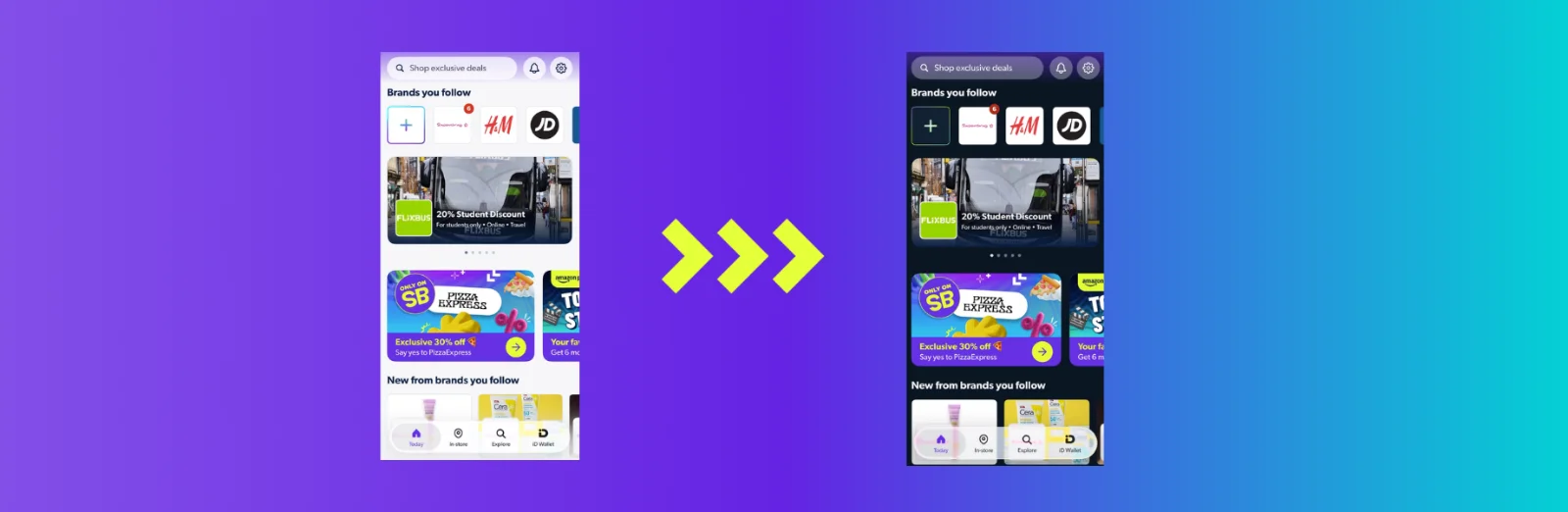
Dark Mode is exactly what it sounds like – a sleek, dark interface for the Student Beans app that's easier on your eyes when you're using it in low-light conditions. Instead of the bright white background, everything flips to darker tones so you can browse deals, explore your discounts, and use ID Wallet without squinting.
It's a subtle change that honestly makes a big difference, especially if you're that person who loves scrolling through deals before bed.
Why you'll actually love this feature
1. Your eyes will thank you
Using your phone in bed or late-night study sessions? Dark Mode reduces eye strain, making those midnight shopping sessions way more comfortable. No more blinding flashes, just smooth, easy browsing.
2. You're in control
We built this because you asked for it. And now you get to decide exactly how you experience the app. Want Dark Mode on? Toggle it on. Prefer Light Mode? Keep it as is. It's that simple.
3. It signals quality
Let's be honest – when an app has Dark Mode, it feels more polished and premium. We're keeping the Student Beans app modern and up-to-date, just like the big players, and that matters for your experience.
4. Battery life bonus
If you're on a phone with an OLED or AMOLED screen (most newer iPhones and Android phones), Dark Mode can actually help preserve your battery. That's a win-win – easier on your eyes and your battery.
How to turn on Dark Mode
Getting Dark Mode up and running is super straightforward:
Open the Student Beans app
Head to Settings (usually found in the menu or bottom navigation)
Toggle Dark Mode on
That's it! You're done.
In fact, if your device is already in dark mode, the SB app will automatically appear in dark mode, too. If you want to toggle it off, just head to settings in the SB app.
Dark Mode FAQs
Is Dark Mode available on all devices?
Dark Mode is currently available on iOS only. If you're on Android, keep an eye out for updates – we're working on it!
I toggled Dark Mode on, but something looks weird. What's happening?
Dark Mode is a visual-only change – if something's not working right, it's not the Dark Mode feature itself. Drop us a message in the help centre and we'll sort it out.
Can I switch back to Light Mode if I change my mind?
Of course! Just head back to Settings and toggle it off. You're in full control of how the app looks. Switch between modes whenever you like.
Will Dark Mode affect any of the app's features or my discounts?
Not at all. It's purely a visual change, so all your favourite features, Student Beans discount codes, and deals work exactly as normal. Nothing changes except what you see.
Does Dark Mode actually save battery?
On OLED and AMOLED screens, Dark Mode can definitely help preserve battery life since darker pixels use less power. It's a nice bonus on top of being easier on your eyes!
Why did it take so long to add Dark Mode?
Great question – we wanted to get it right and make sure it worked seamlessly across the app. We're glad we took the time, and we hope you enjoy it!
Ready to experience the dark side?
Dark Mode is available right now in the Student Beans app (iOS only). Update your app or download it fresh to start using it today.
Check out our ultimate guide to all things SB for handy app updates.
Download the Student Beans App Now
Dark Mode is available on iOS only, running on the latest version of the Student Beans app. Update now to get access.
Unlock even more with Student Beans
All your favourite brands at your fingertips, from fashion and beauty to food and drink, available to college and uni students aged 16 and over. Dive into our blog to find tips and advice to help you navigate student life, from applying to uni to life after graduation.
- Sign up for a Student Beans account or log in to start saving on the biggest and best brands.
- Download the Student Beans app to unlock exclusive app-only discounts.